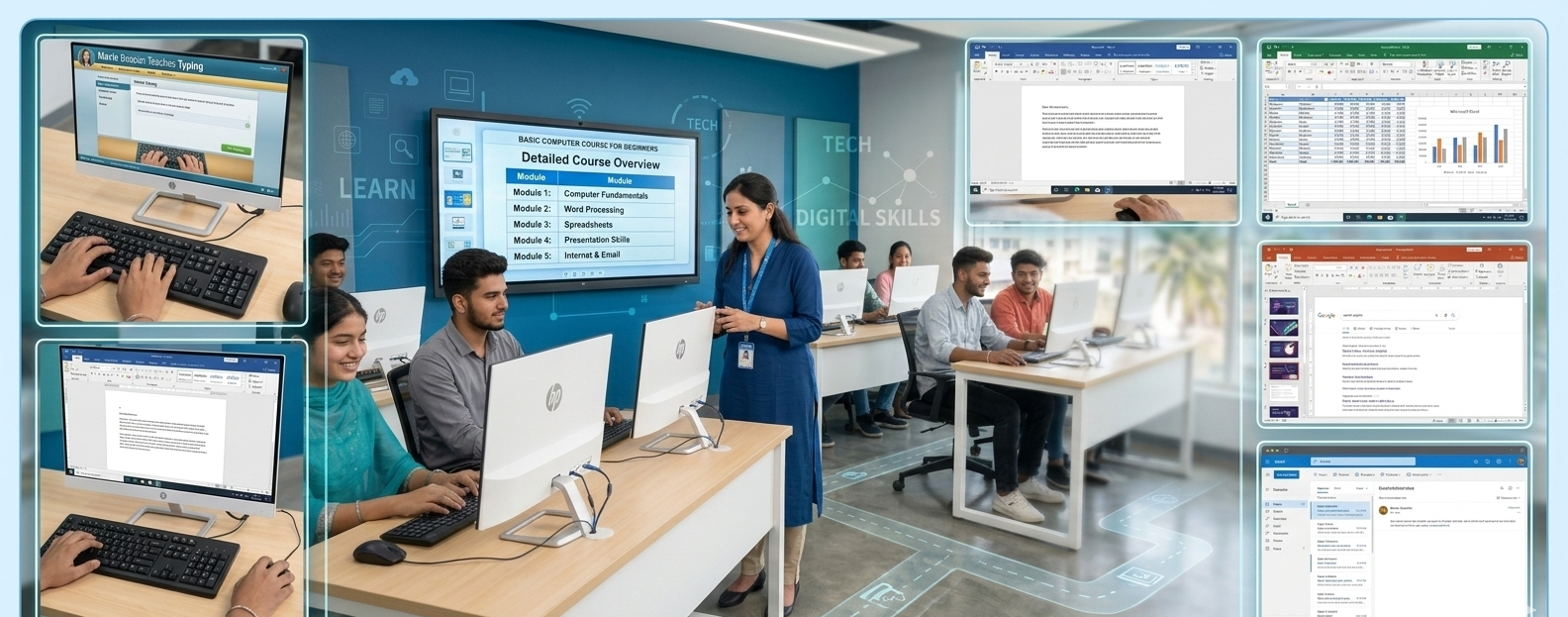
Course Overview — Basic Computer Course in Jalandhar for Beginners
The Basic Computer Course in Jalandhar for Beginners is a comprehensive foundation program designed to help individuals develop essential computer skills required for education, employment, and everyday digital tasks. In today’s technology-driven world, computers are used in almost every field—from schools and colleges to offices, businesses, banks, hospitals, and government services. This course is specially structured for absolute beginners who want to start their digital journey with confidence and practical knowledge.
Whether someone has never used a computer before or has very limited exposure, this course builds skills step by step in a simple and easy-to-understand manner. The training focuses on practical learning, real-life applications, and hands-on experience so that learners become comfortable using computers independently.
Course Objective
The main objective of this course is to make beginners digitally literate and technically confident. Many people hesitate to learn computers because they feel technology is complicated. This course removes that fear by teaching every concept from scratch using beginner-friendly language and guided practice.
By the end of the program, learners will:
-
Understand how computers work
-
Operate systems smoothly and confidently
-
Create professional documents and reports
-
Work with data using spreadsheets
-
Design presentations
-
Use the internet productively
-
Communicate professionally through email
-
Perform essential digital tasks independently
The course ensures students are not just familiar with computers but are capable of using them effectively in real-world situations.
Who Should Enroll
This course is ideal for:
Students
School and college students who want strong computer fundamentals for academic success.
Job Seekers
Candidates preparing for office jobs, clerical roles, and administrative positions.
Beginners
Anyone with little or no prior computer knowledge.
Working Professionals
Employees who want to improve productivity and digital efficiency.
Business Owners
Entrepreneurs managing billing, inventory, and digital records.
Homemakers
Individuals wanting to access online services, payments, and communication tools.
Senior Citizens
Learners seeking digital independence for daily tasks.
No prior qualification or technical background is required.
Course Structure and Learning Method
The course follows a practical learning framework:
Learn → See → Practice → Apply
-
Learn Concepts
Trainers explain topics in simple language.
-
Live Demonstration
Real-time demonstrations help students visualize tasks.
-
Hands-on Practice
Students perform exercises on individual systems.
-
Real-life Application
Practical assignments simulate workplace tasks.
This structure ensures better understanding, retention, and confidence.
Detailed Course Modules
Module 1: Introduction to Computers
This module introduces learners to the world of computers.
Topics covered:
Students become familiar with fundamental concepts before moving ahead.
Module 2: Computer Hardware Fundamentals
Learners understand the physical components of a computer system.
Topics include:
-
Monitor and display units
-
Keyboard and mouse usage
-
CPU and internal components
-
Printers and scanners
-
Storage devices (HDD, SSD, USB drives)
-
Connecting devices and ports
Students learn safe handling and basic troubleshooting.
Module 3: Operating System Basics
Operating systems act as the bridge between users and computers.
Students learn:
Module 4: File and Folder Management
Organizing data is an essential skill.
Learners practice:
-
Creating files and folders
-
Naming and renaming
-
Copying and moving data
-
Deleting and restoring files
-
Using storage devices
-
Organizing digital documents
Module 5: Typing Skills and Keyboard Training
Typing efficiency improves productivity.
Training includes:
-
Proper finger placement
-
Typing techniques
-
Speed building exercises
-
Accuracy improvement
-
Keyboard shortcuts
Regular practice sessions build comfort and speed.
Module 6: Microsoft Word – Document Creation
Students learn professional document preparation.
Key skills:
Module 7: Microsoft Excel – Data and Spreadsheets
Excel helps manage numerical and business data.
Students learn:
-
Spreadsheet basics
-
Rows and columns
-
Data entry
-
Formatting cells
-
Basic formulas
-
Calculations
-
Sorting and filtering
-
Charts and graphs
-
Budget sheets
-
Data organization
Module 8: Microsoft PowerPoint – Presentations
Presentation skills are vital for communication.
Topics covered:
-
Slide creation
-
Layout selection
-
Design themes
-
Text and image placement
-
Animations
-
Transitions
-
Slide show setup
-
Academic presentations
-
Business presentations
Module 9: Internet Fundamentals
Students explore the digital world.
Learning includes:
Module 10: Email and Digital Communication
Professional communication training includes:
Module 11: Online Services and Digital Payments
Students gain digital independence.
Topics include:
-
Online banking basics
-
Digital wallets
-
Bill payments
-
Ticket booking
-
Government portals
-
Online applications
Module 12: Cybersecurity and Safe Internet Use
Digital safety awareness is essential.
Students learn:
Practical Training and Assignments
Hands-on learning is a core focus.
Students complete:
Practical exposure ensures job readiness.
Teaching Methodology
-
Trainer-led interactive sessions
-
Individual computer access
-
Live demonstrations
-
Guided practice
-
Doubt-clearing sessions
-
Regular assessments
-
Supportive learning environment
Course Duration and Flexibility
The course is designed for quick completion while ensuring strong fundamentals. Flexible batch timings are available for students and working professionals.
Certification
Students receive a course completion certificate that validates their computer proficiency and strengthens job applications.
Key Benefits of the Course
Strong Digital Foundation
Builds essential computer knowledge from scratch.
Job Readiness
Prepares learners for entry-level computer-based roles.
Academic Advantage
Helps students complete projects efficiently.
Productivity Boost
Improves workplace efficiency.
Digital Independence
Enables individuals to manage personal online tasks.
Confidence Building
Removes fear of technology.
Career Opportunities After Completion
Learners can apply for roles such as:
-
Computer Operator
-
Data Entry Operator
-
Office Assistant
-
Administrative Executive
-
Back Office Executive
-
Billing Operator
-
Front Desk Executive
-
Customer Support Staff
Future Learning Path
After mastering basics, students can pursue:
Learning Environment
The course provides a beginner-friendly atmosphere where students feel comfortable asking questions and practicing skills without hesitation.
Importance in Today’s Digital World
From education to employment and business operations, digital skills are now mandatory. Computer literacy ensures equal opportunities and career growth.
Advanced Practical Exposure and Skill Development
A strong highlight of the Basic Computer Course in Jalandhar for Beginners is its focus on practical exposure that goes beyond textbook learning. Beginners often struggle not because concepts are difficult, but because they don’t get enough hands-on practice. This course ensures that every learner spends maximum time working directly on a computer system, performing real tasks that simulate everyday academic and workplace activities.
Students repeatedly practice essential operations such as file handling, typing documents, formatting reports, organizing folders, using USB drives, and managing system settings. Repetition builds muscle memory and confidence, allowing learners to work faster and more accurately. By the end of the program, students no longer hesitate while using computers—they operate them naturally and efficiently.
Practical lab sessions are structured to gradually increase complexity. Learners start with simple exercises like creating folders and typing basic text. They then move to advanced tasks such as designing structured documents, managing spreadsheets with formulas, preparing professional presentations, and handling online services. This step-by-step progression ensures that no learner feels overwhelmed.
Real-World Task Simulation
To make training industry-relevant, students work on assignments that reflect real-life responsibilities. These include:
-
Drafting job application letters
-
Creating professional resumes
-
Preparing school and college project reports
-
Designing fee sheets and expense records
-
Making business presentations
-
Managing customer data sheets
-
Filling online application forms
-
Sending professional emails with attachments
These tasks help learners understand how computers are used in offices, educational institutions, and business environments.
Communication and Workplace Readiness
Digital skills alone are not enough in modern workplaces. Professionals are expected to communicate clearly and present information effectively. This course integrates basic workplace readiness training so students feel confident in professional environments.
Learners practice writing formal emails, organizing documents properly, naming files professionally, and presenting information using slides. They also learn how to behave in digital meetings, share files responsibly, and maintain professional etiquette while communicating online.
This combination of technical and communication skills prepares students for real office settings.
Confidence Building for First-Time Users
Many beginners feel anxious while using computers. Fear of making mistakes often prevents them from learning efficiently. This course is designed with patience and encouragement at its core.
Trainers guide students individually and allow them to learn at their own pace. No question is considered too basic. Mistakes are treated as part of the learning process, which helps students overcome hesitation and develop confidence.
As learners become familiar with common tasks, their comfort level increases. This transformation—from fear to fluency—is one of the most valuable outcomes of the program.
Digital Literacy for Everyday Life
Computer knowledge today is not limited to office work. Daily life increasingly depends on digital services. This course helps learners become digitally independent citizens.
Students learn how to:
-
Pay electricity and mobile bills online
-
Book train and bus tickets
-
Access banking services digitally
-
Use online shopping platforms
-
Register for government schemes
-
Download important documents
-
Use video calling applications
-
Access online learning platforms
These skills save time, reduce dependency on others, and make daily life more convenient.
Personalized Learning Support
Every learner has a different pace and background. Some grasp concepts quickly, while others need additional practice. The course structure ensures personalized attention so no student feels left behind.
Small batch sizes allow trainers to focus on individual progress. Extra lab hours and revision sessions are provided for learners who need more practice. Doubt-clearing sessions help students strengthen weak areas.
Regular feedback also helps students track their improvement and stay motivated.
Assessment and Progress Tracking
To ensure skill development, the course includes regular evaluations. These are designed to test practical understanding rather than theoretical memorization.
Assessment methods include:
Continuous evaluation ensures students are truly learning and improving.
Industry-Relevant Skill Alignment
Employers today expect candidates to have basic computer proficiency regardless of job role. From reception desks to back-office operations, digital skills are essential everywhere.
This course aligns training with workplace expectations. Students learn how to handle documents, manage data, communicate professionally, and operate systems efficiently—skills that directly match employer requirements.
Foundation for Advanced Technical Courses
A beginner computer course acts as a stepping stone toward advanced learning. Once students gain confidence with basic tools and systems, they can easily move to specialized fields.
After completing this course, learners feel prepared to explore:
A strong base ensures faster progress in advanced domains.
Productivity and Time Management Benefits
Computer skills significantly improve work speed and efficiency. Tasks that once took hours can be completed in minutes using digital tools.
Students learn how to:
These productivity gains benefit both students and professionals.
Professional Presentation Skills
Presenting information clearly is an essential career skill. The course teaches students how to design structured presentations using slides, visuals, and data.
This helps learners:
-
Deliver academic seminars
-
Present business ideas
-
Participate in office meetings
-
Explain reports confidently
Strong presentation skills improve career growth opportunities.
Supportive and Motivating Environment
A positive learning atmosphere helps beginners grow faster. Friendly trainers, collaborative classmates, and interactive sessions make learning enjoyable.
Students feel comfortable practicing repeatedly and asking questions without hesitation. This supportive environment encourages continuous improvement.
Long-Term Career Value
Computer literacy is a lifelong asset. The skills learned in this course remain useful across industries and career stages. Whether someone works in education, business, healthcare, retail, or government services, computer knowledge remains relevant.
The course equips learners with skills that grow with them throughout their professional journey.
Why Choose Techcadd Computer Institute for a Basic Computer Course in Jalandhar
Choosing the right institute is one of the most important decisions when starting your computer education journey. A beginner-friendly course can only deliver real value when it is backed by experienced trainers, practical learning systems, modern infrastructure, and strong student support. Techcadd Computer Institute has built a reputation as one of the most trusted training centers for foundational and career-oriented computer education. For beginners stepping into the digital world, the institute provides the right environment, structured learning path, and practical exposure needed to grow with confidence.
This section explains in detail why Techcadd stands out as a preferred destination for students, job seekers, and professionals who want to learn basic computer skills effectively.
Student-Centered Learning Approach
Techcadd follows a student-first philosophy. Every course is designed keeping beginners in mind—especially those who may have never used a computer before. Trainers understand that each learner has a different pace, comfort level, and background. The teaching style is patient, supportive, and interactive, ensuring no student feels left behind.
Complex technical terms are explained in simple language. Concepts are demonstrated live before students practice them individually. Trainers encourage questions and repeat explanations whenever needed. This approach removes fear and builds confidence steadily.
Students are treated as learners, not just attendees. Their progress, comfort, and skill development are the top priorities.
Experienced and Supportive Trainers
A course is only as good as the trainers delivering it. Techcadd’s faculty members are qualified professionals with strong technical expertise and real teaching experience. They understand how to train beginners who may be completely new to computers.
Trainers focus on:
Their friendly teaching style creates a comfortable classroom atmosphere where students feel free to learn without hesitation.
Practical Training-Focused Curriculum
Techcadd strongly believes that computer skills can only be mastered through hands-on practice. The institute emphasizes practical learning more than theoretical lectures.
Students spend most of their class time working on computers, practicing real tasks such as:
-
Typing and formatting documents
-
Creating resumes and letters
-
Working with spreadsheets
-
Designing presentations
-
Browsing the internet
-
Sending professional emails
-
Organizing digital files
This practice-oriented model ensures learners gain real confidence and job-ready skills.
Modern Computer Lab Infrastructure
A good learning environment requires the right facilities. Techcadd provides modern, well-equipped computer labs designed to support practical learning.
Key infrastructure features include:
-
Latest computer systems
-
High-speed internet connectivity
-
Updated software tools
-
Comfortable seating
-
Proper lighting and ventilation
-
Projector-based visual demonstrations
Each student gets access to an individual system for uninterrupted practice, ensuring better learning outcomes.
Beginner-Friendly Environment
Many people hesitate to join computer classes because they feel they are “too late” to start or fear making mistakes. Techcadd creates a welcoming environment where beginners feel comfortable from day one.
The institute promotes:
-
No-judgment learning atmosphere
-
Friendly trainers and staff
-
Supportive peer groups
-
Encouragement for slow learners
-
Positive motivation
Students gradually become comfortable with computers and develop confidence naturally.
Structured and Industry-Relevant Curriculum
Techcadd’s Basic Computer Course is designed to match real-world requirements. Instead of outdated theory, the curriculum focuses on skills that are actually used in offices, businesses, and daily digital life.
The structured syllabus ensures students learn in the correct sequence:
-
Fundamentals first
-
Tool usage second
-
Application-based tasks next
-
Real-world practice at the end
This logical progression helps learners build a strong foundation.
Personalized Attention and Small Batch Sizes
One of the biggest advantages of learning at Techcadd is individual attention. Unlike crowded classrooms where students struggle to get help, Techcadd maintains small batch sizes.
Benefits include:
-
Trainers can focus on each student
-
Faster doubt resolution
-
Better practice monitoring
-
Customized learning pace
-
Improved student performance
Every learner receives the guidance they need.
Flexible Batch Timings
Techcadd understands that students and professionals have different schedules. To accommodate everyone, the institute offers flexible batch options.
This helps:
-
School and college students attend after classes
-
Working professionals join evening sessions
-
Homemakers choose convenient timings
-
Learners balance studies with other commitments
Flexibility ensures no one misses learning opportunities.
Regular Practice Assignments
Skill development requires consistent practice. Techcadd provides regular lab exercises and assignments that reinforce learning.
Students complete tasks like:
Assignments strengthen understanding and improve speed.
Progress Tracking and Assessments
Techcadd believes in measurable learning outcomes. Regular assessments help students track their progress and identify areas for improvement.
Evaluation methods include:
-
Practical tests
-
Module assessments
-
Project work
-
Task-based evaluations
Continuous monitoring ensures students stay on the right path.
Certification with Career Value
Upon course completion, students receive a recognized certificate validating their computer skills. This certificate strengthens resumes and improves employability.
Employers value certified candidates because certification reflects structured training and verified knowledge.
Job-Oriented Skill Development
Techcadd designs courses to enhance employability. Basic computer skills are essential for numerous entry-level roles across industries.
The training prepares students for positions such as:
-
Computer Operator
-
Data Entry Executive
-
Office Assistant
-
Front Desk Executive
-
Back Office Staff
-
Billing Executive
-
Customer Support Staff
Students become workplace-ready with practical competence.
Career Guidance and Support
Beyond technical training, Techcadd supports students with career direction. Beginners often feel confused about future learning paths. Trainers provide guidance on:
-
Advanced courses
-
Skill specialization
-
Career options
-
Industry trends
This mentorship helps learners plan their professional journey.
Affordable Fee Structure
Quality education should be accessible to everyone. Techcadd offers cost-effective courses designed to provide maximum value at affordable fees.
This makes professional computer education accessible to:
-
Students
-
Job seekers
-
Middle-income families
-
Career starters
Affordable learning widens opportunities.
Focus on Digital Independence
Techcadd empowers learners beyond job skills. Students gain digital literacy that helps them in everyday life.
They learn how to:
This independence builds confidence.
Safe and Supportive Learning Space
The institute maintains a disciplined, respectful, and safe environment for all learners. A comfortable learning space enhances concentration and motivation.
Strong Local Reputation
Techcadd has earned trust through consistent training quality and student satisfaction. Positive word-of-mouth and successful alumni contribute to its strong local reputation.
Continuous Skill Improvement Culture
The institute promotes continuous learning. Students are encouraged to upgrade their skills and explore advanced technologies after completing basic training.
Foundation for Advanced Learning
A strong base at Techcadd prepares students for higher-level courses like:
-
Programming
-
Graphic Design
-
Web Development
-
Digital Marketing
-
Data Analytics
-
Accounting Software
Students progress confidently.
Confidence Transformation
Many beginners start with hesitation but complete the course with confidence. This personal growth is one of Techcadd’s biggest strengths.
Community and Peer Learning
Students learn alongside peers with similar goals. Group activities and collaborative tasks make learning engaging.
Commitment to Student Success
Techcadd measures its success through student achievement. The institute remains committed to helping learners gain skills that truly matter.
Strong Focus on Skill Confidence, Not Just Course Completion
Many training institutes focus only on finishing the syllabus. Techcadd takes a different approach—it focuses on ensuring that every student truly understands and can confidently apply what they learn. The goal is not to rush through topics but to build real competence.
Students are encouraged to practice repeatedly until they feel comfortable performing tasks independently. Trainers observe how learners work on computers and provide corrective guidance wherever needed. This method ensures students don’t just “learn” but actually “master” essential computer skills.
Confidence is built through practice, encouragement, and consistent support. By the end of the course, students can operate computers smoothly without assistance.
Real Office Workflow Exposure
Techcadd prepares beginners for real workplace environments by simulating office-style workflows during training. Students learn how tasks are handled in professional settings rather than only practicing isolated exercises.
They are trained to:
-
Create and organize official documents
-
Maintain digital records systematically
-
Prepare reports using structured formats
-
Handle spreadsheets for accounts and data
-
Create presentations for meetings
-
Manage professional email communication
This exposure reduces the gap between classroom learning and job responsibilities.
Emphasis on Professional Discipline
Professional success depends not only on skills but also on discipline and work habits. Techcadd integrates professional behavior into its training culture.
Students develop habits such as:
-
Punctuality
-
Organized digital work
-
Proper file naming conventions
-
Clean document formatting
-
Responsible internet usage
-
Respectful communication
These small but important habits prepare learners for real corporate environments.
Comfortable Learning Pace for Beginners
Absolute beginners often worry about learning speed. Techcadd ensures a balanced pace that suits all learners. Trainers move forward only after confirming that students understand current topics.
Slow learners receive additional attention, while faster learners are given advanced practice tasks to stay engaged. This flexible pacing prevents pressure and improves learning quality.
Repetition-Based Learning for Better Retention
Learning computers requires doing tasks multiple times. Techcadd incorporates repetition-based training so students retain knowledge long-term.
Important tasks such as formatting documents, creating spreadsheets, saving files, and sending emails are practiced repeatedly. This helps learners remember processes naturally without memorization.
Hands-On Problem Solving
Students often face small technical issues while using computers. Instead of ignoring them, Techcadd teaches learners how to identify and solve basic problems.
They learn:
-
Fixing minor typing and formatting errors
-
Managing file save locations
-
Handling print settings
-
Correcting spreadsheet mistakes
-
Troubleshooting common system issues
Problem-solving ability builds independence and reduces reliance on others.
Encouragement for First-Generation Computer Learners
Many students come from non-technical backgrounds or rural areas where computer exposure is limited. Techcadd actively supports first-generation learners by providing extra guidance and motivation.
Trainers ensure these students feel comfortable asking basic questions. The supportive atmosphere helps them overcome hesitation and grow confidently.
Practical Over Theory Teaching Philosophy
Techcadd believes computer education must be practical. Instead of heavy theory sessions, students learn by doing.
For every concept taught, learners immediately apply it through exercises. This makes classes interactive, engaging, and effective.
Updated Learning Practices
Technology evolves constantly. Techcadd ensures students learn modern tools and updated practices relevant to current workplace requirements.
Learners train on current software interfaces and modern digital methods rather than outdated systems.
Friendly Support Staff and Administration
A positive institutional experience depends on more than classrooms. Techcadd’s support staff helps students with scheduling, lab access, and administrative assistance.
Friendly coordination ensures a smooth learning journey from enrollment to certification.
Motivation and Positive Learning Culture
Learning becomes easier in a motivating environment. Trainers appreciate student progress and encourage improvement. Positive reinforcement keeps learners enthusiastic and committed.
Equal Learning Opportunity for All Age Groups
Techcadd welcomes learners of all ages. Whether a young student, working adult, homemaker, or senior citizen, everyone receives equal attention and respect.
Inclusive learning strengthens confidence across age groups.
Practical Projects That Build Portfolios
Students complete mini-projects that showcase their skills, such as:
-
Resume design
-
Business letter drafting
-
Expense tracking sheets
-
Presentation slides
-
Email writing samples
These projects act as proof of practical ability.
Long-Term Learning Relationship
Techcadd builds lasting connections with students. Even after course completion, learners can seek guidance for advanced courses and career direction.
Strong Word-of-Mouth Trust
Student satisfaction drives recommendations. Many new learners join Techcadd through referrals from successful students, reflecting trust and credibility.
Focus on Outcome-Based Education
The institute measures success through student skill improvement and confidence—not just enrollments. This outcome-focused mindset ensures real value.
Preparation for a Digital Future
As workplaces become more digital, computer literacy becomes essential. Techcadd ensures students are prepared for long-term digital growth.
Future Scope of a Basic Computer Course in Jalandhar for Beginners
In today’s fast-evolving digital era, computer literacy is no longer an optional skill—it is a fundamental requirement for education, employment, entrepreneurship, and everyday living. A Basic Computer Course for Beginners lays the foundation for long-term digital growth and opens doors to a wide range of academic, professional, and business opportunities. Learners who start with essential computer skills gain the confidence and capability to adapt to modern technology, making them future-ready in an increasingly competitive world.
This section explores the long-term future scope and growth opportunities that arise after completing a basic computer course.
Growing Importance of Digital Skills
Every industry is becoming technology-driven. From small offices to multinational corporations, digital tools are used for communication, documentation, data management, billing, marketing, and customer service. Individuals who lack computer knowledge often face limited career opportunities.
A basic computer course ensures learners are digitally literate and capable of handling essential tasks such as documentation, spreadsheets, presentations, emails, and internet usage. These skills form the backbone of modern professional life.
As digital adoption continues to expand across sectors, the demand for computer-literate individuals will keep increasing.
Strong Foundation for Advanced IT Courses
A beginner-level computer course acts as the first stepping stone toward specialized technical education. Once learners become comfortable with basic operations, they can confidently pursue advanced courses.
Future learning pathways include:
Programming and Software Development
Students can learn coding languages and build careers in software development, app creation, and system design.
Web Designing and Development
Learners can move into website creation, UI/UX design, and web application development.
Graphic Designing
Creative individuals can explore visual design, branding, multimedia editing, and digital content creation.
Data Analytics
Students interested in numbers and insights can pursue data analysis and business intelligence.
Digital Marketing
Learners can build careers in SEO, social media marketing, online advertising, and content strategy.
Accounting and Financial Software
Commerce students can specialize in computerized accounting tools and financial management systems.
A strong base makes advanced technical skills easier to learn and apply.
Expanding Career Opportunities
Computer literacy significantly improves employability. Almost every modern job role requires basic digital skills.
After completing a basic computer course, learners can apply for entry-level roles such as:
-
Computer Operator
-
Data Entry Operator
-
Office Assistant
-
Administrative Executive
-
Front Desk Coordinator
-
Back Office Executive
-
Billing Executive
-
Customer Support Staff
-
Documentation Assistant
These roles exist across industries including education, healthcare, retail, banking, logistics, hospitality, and government services.
Opportunities in Government and Public Sector
Government offices are rapidly digitizing services. Online documentation, digital records, e-governance portals, and computerized workflows are becoming standard.
Computer-literate candidates gain advantages in:
-
Clerical and administrative positions
-
Data management roles
-
Online service centers
-
Public facilitation offices
-
Examination and recruitment processes
Basic computer knowledge is often a mandatory eligibility criterion for many government job applications.
Growth in Private Sector Employment
Private companies expect employees to be digitally skilled. Even non-technical roles require computer proficiency.
Fields offering opportunities include:
-
Corporate offices
-
Retail chains
-
Educational institutions
-
Healthcare centers
-
Travel agencies
-
Real estate firms
-
Service-based businesses
Digital efficiency improves productivity and job performance, making candidates more valuable.
Freelancing and Remote Work Possibilities
The rise of remote work has created flexible income opportunities. With basic computer skills, learners can begin freelancing careers and work from home.
Opportunities include:
-
Data entry projects
-
Online form processing
-
Virtual assistance
-
Content formatting
-
Document preparation
-
Presentation design
Freelancing allows individuals to earn independently without office-based jobs.
Support for Higher Education
Students pursuing higher studies benefit greatly from computer literacy.
They can:
Digital skills improve academic performance and efficiency.
Entrepreneurship and Small Business Growth
Entrepreneurs rely heavily on digital tools for operations and marketing.
Basic computer knowledge helps business owners:
-
Maintain billing records
-
Track expenses
-
Manage inventory
-
Communicate with clients
-
Create promotional materials
-
Use social media marketing
-
Access online marketplaces
Digital efficiency improves business growth and competitiveness.
Digital Independence in Daily Life
Computer literacy empowers individuals to handle daily responsibilities independently.
Learners can:
-
Use online banking services
-
Pay utility bills
-
Book travel tickets
-
Shop online
-
Access telemedicine services
-
Apply for official documents
-
Use digital government services
This reduces dependency and saves time.
Pathway to IT and Tech Careers
Many successful IT professionals began with basic computer education. A beginner course builds the confidence needed to explore technology careers.
With further training, learners can become:
-
Software Developers
-
Web Developers
-
System Administrators
-
IT Support Specialists
-
Database Managers
-
Network Technicians
-
Cybersecurity Analysts
The technology sector offers high-growth, high-paying career paths.
Global Employment Opportunities
Computer skills are universal. Digital literacy allows individuals to work across cities and countries.
Basic proficiency supports:
Digital knowledge removes geographical limitations.
Foundation for Lifelong Learning
Technology evolves continuously. A basic course helps learners stay adaptable and open to new tools and systems.
Digitally confident individuals can easily learn:
-
New software
-
Emerging technologies
-
Online tools
-
Automation systems
-
AI-powered platforms
Lifelong learning ensures career sustainability.
Productivity and Efficiency Gains
Computer skills save time and improve work quality.
Learners perform tasks faster:
Higher productivity leads to better performance and promotions.
Professional Communication Enhancement
Modern workplaces rely on digital communication tools.
Students learn to:
Effective communication improves career growth.
Competitive Advantage in Job Market
Employers prefer candidates with computer proficiency. Basic digital skills increase selection chances and reduce training needs.
Candidates stand out during recruitment.
Confidence and Personality Development
Digital knowledge improves self-confidence. Learners feel comfortable using technology in professional and social settings.
Confidence enhances communication and decision-making.
Support for Emerging Digital Economy
As India’s digital economy grows, technology skills become essential for participation.
Digitally skilled individuals contribute effectively to economic growth.
Adaptability to Technological Change
Future workplaces will use advanced digital systems. Basic computer knowledge helps learners adapt quickly to new environments.
Future-Proof Skill Set
Computer literacy remains relevant regardless of industry trends. It is a timeless skill that supports long-term career stability.
Future Scope in Emerging Digital Work Environments
As workplaces rapidly transition toward digital systems, the value of basic computer knowledge continues to grow. Offices are moving away from paperwork and manual processes toward cloud platforms, digital documentation, automated workflows, and virtual collaboration tools. Individuals who are comfortable using computers adapt quickly to these modern work environments.
Employees with foundational computer skills can easily learn new workplace software, operate digital dashboards, manage online records, and collaborate using virtual tools. This adaptability ensures long-term relevance in evolving industries and protects professionals from becoming outdated in the job market.
Opportunities in the Expanding Service Sector
The service sector is one of the fastest-growing employment areas and relies heavily on digital systems. Industries such as education, healthcare, hospitality, banking support, logistics, retail operations, and customer service all require staff who can operate computers efficiently.
Basic computer course graduates can find opportunities in:
-
School and college administrative offices
-
Hospital front desks and record departments
-
Customer service centers
-
Retail billing counters
-
Travel and ticketing agencies
-
Warehousing and logistics coordination
These roles require accurate data handling, digital documentation, and communication skills that are developed during foundational computer training.
Scope in Digital Documentation and Record Management
Organizations increasingly maintain digital records instead of physical files. Skilled computer users are required to create, organize, and manage digital documentation systems.
Professionals with basic computer training can handle:
-
Digital filing systems
-
Electronic data entry
-
Record digitization projects
-
Document formatting and reporting
-
Spreadsheet-based tracking systems
Digital record management improves operational efficiency, making trained individuals valuable assets.
Role in Online Education and E-Learning Growth
Education is becoming increasingly technology-driven. Schools, colleges, coaching centers, and universities now use digital platforms for teaching, testing, and communication.
Students and educators with computer literacy can:
-
Attend and conduct virtual classes
-
Prepare digital assignments
-
Create presentations for lectures
-
Access online study materials
-
Submit projects electronically
Basic computer skills ensure active participation in modern education systems.
Support for Digital India Initiatives
India’s rapid digital transformation is expanding access to online services and technology-driven governance. Citizens with computer knowledge can fully benefit from digital public services.
They can:
-
Access government portals
-
Apply for official certificates online
-
Use digital identity services
-
Participate in online schemes
-
Utilize e-governance facilities
Digital literacy supports inclusive participation in national development programs.
Gateway to Creative Digital Careers
Basic computer skills also open doors to creative professions. Once comfortable with systems and software, learners can explore creative digital tools.
Future creative pathways include:
These fields allow flexible, independent career options.
Opportunities in Work-from-Home Careers
Remote employment is becoming mainstream. Many companies now hire employees who can work efficiently from home using digital tools.
With basic computer knowledge, individuals can perform:
Work-from-home careers provide flexibility and reduce commuting time.
Contribution to Small Business Digitization
Small and medium businesses are adopting digital systems to stay competitive. Computer-literate individuals help local enterprises modernize operations.
They can support businesses in:
Digitization improves efficiency and customer reach.
Foundation for Technology Entrepreneurship
Basic computer knowledge is the first step toward digital entrepreneurship. With further skill development, individuals can build technology-driven ventures.
Possible future ventures include:
-
Online service centers
-
Digital documentation services
-
E-commerce businesses
-
Freelance service platforms
-
Local digital consultancy
Entrepreneurship creates income opportunities and job creation.
Improved Workplace Growth and Promotions
Employees with computer skills perform tasks faster and more accurately. This leads to better productivity and recognition.
Digitally skilled professionals are more likely to:
Computer literacy directly contributes to career growth.
Future Scope in Automation-Supported Roles
Automation is increasing across industries, but human operators are still required to manage digital systems. Workers with computer knowledge can operate automated platforms and monitoring tools effectively.
This ensures continued employability in tech-enabled workplaces.
Lifelong Personal Benefits
Beyond careers, computer literacy improves quality of life. Individuals stay connected, informed, and independent.
They can:
Digital knowledge enriches daily living.
Building Confidence for the Digital Future
Technology will continue shaping how people work and live. Those comfortable with computers feel confident adapting to future innovations.
Confidence encourages continuous learning and growth.
Gateway to Creative Digital Careers
Basic computer skills also open doors to creative professions. Once comfortable with systems and software, learners can explore creative digital tools.
Future creative pathways include:
These fields allow flexible, independent career options.