School students
Build strong computer, typing and office skills alongside school studies.


Use computers, office software, the internet and everyday AI tools with confidence — for study, work and daily life.
Program snapshot
Basic Skill and Programs · Beginner
Same trainers and live projects on every track. Pick the length that fits your semester or career plan — a counsellor shares fees and scholarships.
3months
Core skills and guided projects for students on a short timeline or professionals upskilling.
6months
University-approved industrial training with a live project, training report and internship letter.
9months
Everything in the 6-month track plus advanced modules and an internship on real client work.
This practical program builds everyday digital confidence: using a computer and files, MS Office and Google Workspace, fast typing, internet and email, safe digital payments, and simple AI tools like ChatGPT. You practise on a computer in every session, at your own pace.
It suits school students, 10+2 pass-outs preparing for jobs or government exams, office staff, homemakers and seniors across Punjab. You finish by writing an introductory program, so you can decide whether a coding career interests you.
Included on every track.
Who can join: Anyone who can read and write — no prior computer knowledge needed.
3 phases, each ending in work you can show. Tap a phase or use the arrow keys to explore.
Phase 1 of 3
Get comfortable with the computer, files and a keyboard.
By the end: You can operate a computer and organise your files confidently.
Phase 2 of 3
Create documents, sheets and presentations, and use the internet safely.
By the end: You can handle everyday office work and online services safely.
Phase 3 of 3
Use AI assistants responsibly and write your first simple programs.
By the end: You can use AI tools sensibly and write a basic program.
Basic computer skills are now expected in almost every job, from offices and shops to government forms — this program makes you employable and independent in a digital world.
Anyone who can read and write — no prior computer knowledge needed.
Build strong computer, typing and office skills alongside school studies.
Get job-ready computer skills for office roles and exam applications.
Work faster with Excel, email, documents and online portals.
Manage billing sheets, digital payments and customer communication online.
Regain confidence with computers and prepare to return to work.
Learn video calls, online banking and safe browsing at your own pace.
You install, configure and ship with every one of these in the lab — the stack employers expect on day one.
Operating system basics
Letters, resumes and documents
Lists, tables and simple formulas
Presentations and slides
Gmail, Docs, Sheets and Drive
Typing speed practice
Safe digital payments
Everyday AI assistance
Visual intro to coding
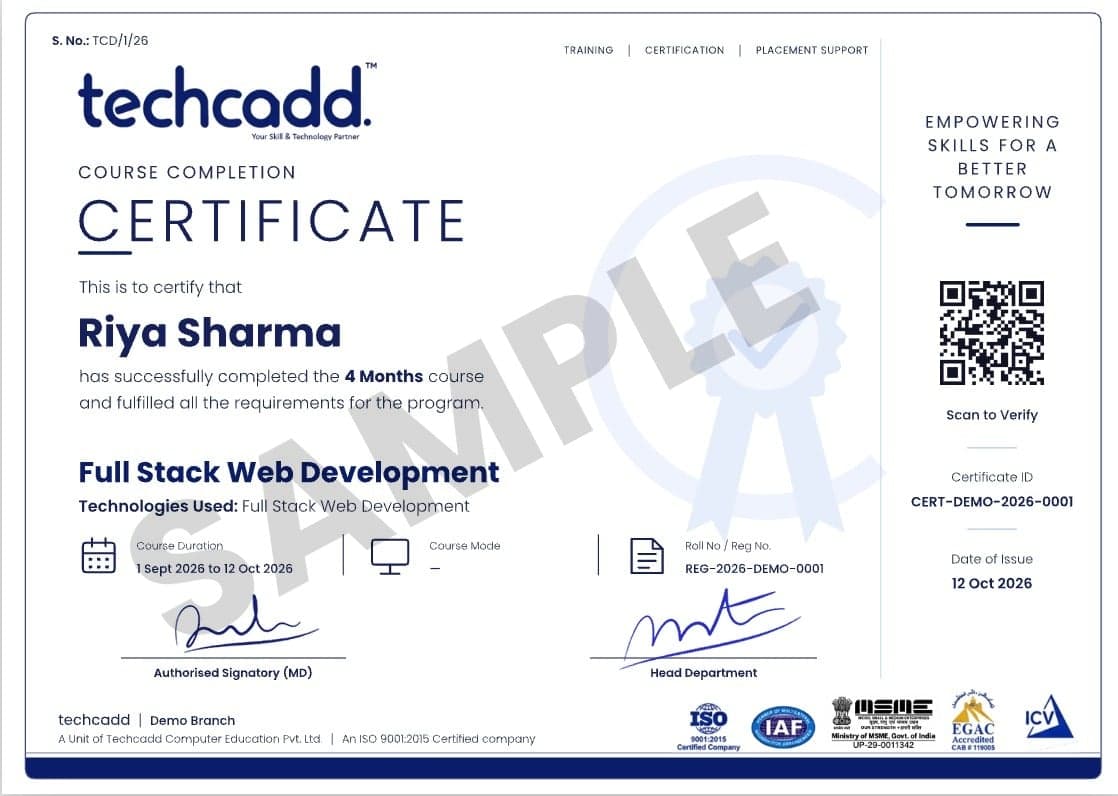
Industry recognised
QR-verifiable certificate with your course, duration, registration number and certificate ID.
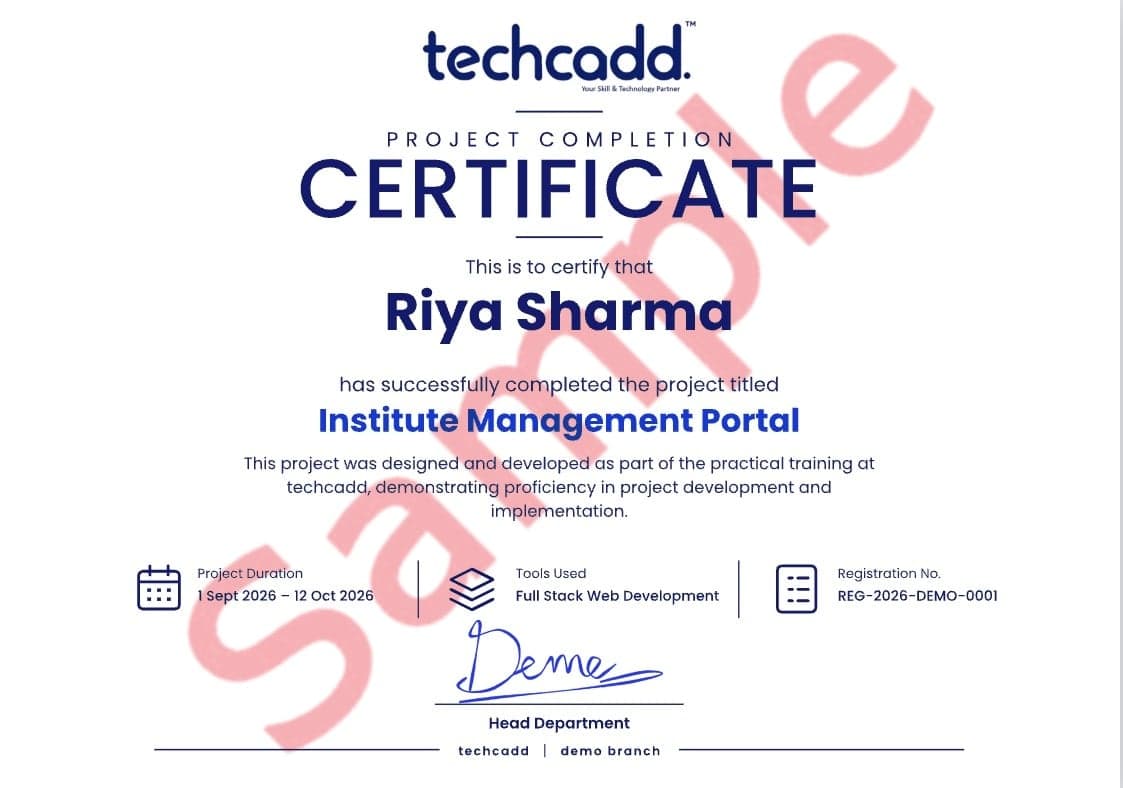
Live project
Names the live project you built, its tools and dates — issued with your internship letter for university training credit.
Every certificate has a unique number that anyone can verify on techcaddjalandhar.com.
Online-verifiable certificate listing your modules, projects and grade.
Experience letter for your live-project internship, accepted for university credit.
Four reviewed projects on GitHub or Behance that you can walk an interviewer through.
Resume and portfolio review, mock interviews and referrals until you are hired.
Straight answers to the career questions students ask us most.
Common roles include data entry operator, computer operator, office assistant, front-desk executive, billing clerk and back-office staff — roles that almost every business and institution needs.
Strong Excel and office skills lead to roles like MIS executive, accounts assistant or office coordinator. Adding Tally, advanced Excel or digital marketing opens further growth.
Yes. Typing, data entry, document formatting and online form filling are common home-based and freelance tasks, and many small businesses need part-time help with them.
Offices, schools, hospitals, banks' back offices, shops, factories' admin teams and service centres across Jalandhar, Ludhiana, Amritsar and Chandigarh, as well as online data-entry and support roles.
Move to data analytics for advanced Excel and reports, digital marketing for online business skills, or full stack development if you enjoyed the programming introduction.
Each project is reviewed by a trainer and published to your portfolio before you move on.
Create a well-formatted resume and cover letter in Word, save it as PDF and email it.
Build an Excel sheet that tracks monthly spending with totals, simple formulas and a chart.
Set up a stock list and billing sheet in Google Sheets for a local shop, shared online.
Present a slide deck of your work, including an AI-assisted document and your first Python program.
Repeated for every module, so the job feels familiar before you get it.
Every task starts like a real job: a brief, a deadline and a clear definition of done.
You build it yourself in the lab while a mentor reviews your work and unblocks you.
Demo your work and answer questions — practice for interviews and client calls.
Mentors who still ship real projects for clients.
Real briefs, not copy-paste sample projects.
Personal attention and same-day doubt clearing.
Longer tracks include an internship and experience letter.
Resume, mock interviews and referrals to 500+ partners.
Nearly two decades of training students across North India.
What changes when training is built around live work.
| What matters | TechCADD | Typical institute |
|---|---|---|
| Training style | Hands-on labs every class | Mostly theory & slides |
| Projects | Live client briefs & capstone | Sample projects only |
| Batch size | Small batches | Large classrooms |
| Trainer background | Working industry professionals | Full-time trainers only |
| Internship | Included in longer tracks | Rarely offered |
| Placement support | Resume, mock interviews & referrals | Job list on request |
| Doubt clearing | Same day, 1:1 if needed | Weekly, if at all |
| Certification | Verifiable certificate + internship letter | Paper certificate |
4.9750+ Google reviews
Switch modes if your schedule changes — your projects and progress move with you.
Lab-based batches at our North India branches.
Interactive live sessions with recordings for revision.
Saturday–Sunday batches for college students and working people.
Personal mentoring at your pace and schedule.
7 questions
Absolutely. The program starts from switching on a computer and using a mouse. Trainers explain in English, Hindi or Punjabi and give you extra practice time whenever you need it.
No. Classroom batches use our lab computers. For online classes, any laptop or desktop with internet works; a smartphone is useful for practising UPI and app-based tasks.
You receive a verifiable training certificate that you can attach to job and exam applications. For university industrial training, students usually choose a technical program such as Full Stack or Data Analytics.
Besides office software, it covers digital payments and scam safety, everyday AI tools and an introduction to programming — the skills people need today, not just typing and MS Office.
No institute can honestly guarantee a job. We provide placement assistance — resume and portfolio reviews, mock interviews and referrals to 500+ hiring partners — and keep supporting you until you are placed.
Book a free counselling session or message us on WhatsApp. A counsellor will share the current fee, EMI options and scholarships for your chosen track.
Yes. Book a free demo using the form on this page or call us. You can attend at any branch or join a live online class.
Sit in a free demo class or talk to a counsellor about your background and goals — no obligation.
Tell us a little about yourself — we'll suggest the right track, share fee and scholarship details and book your free demo.
2nd Floor, Crystal Plaza, SCS 78, Opposite PIMS Hospital, Jalandhar, Punjab 144001Mon – Sat: 9:00 AM – 7:00 PM